User First Time Login / Password Reset

User First Time Login / Password Reset

How to Login to SportsWareOnLine for the First Time


These instructions are for Users of SportsWare who have already been added to an account. This can happen either by an Admin ATC on the account or from CSMi directly. If you need to be added to an account, please go back to the Getting Started section and click the appropriate help article.


1. Go to www.swol123.net on a computer


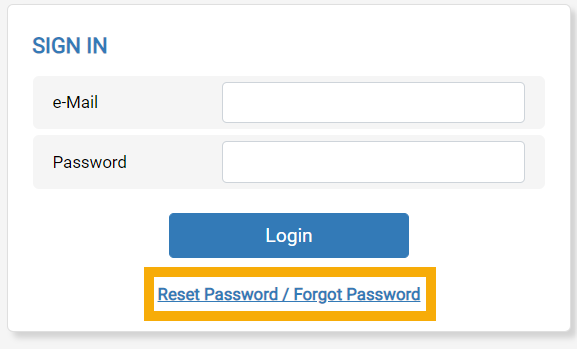
2. Under the SIGN IN box, enter your e-mail address and click the Reset Password/Forgot Password LinkGraphical user interface, application, website

Description automatically generated
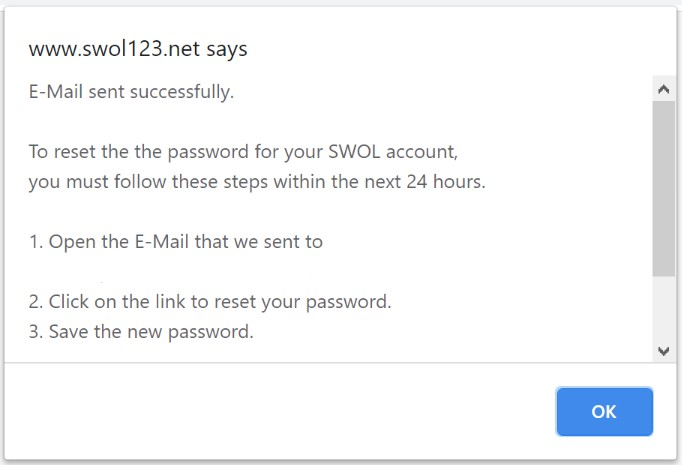
3. You will now see this pop-up. If you do not, you may need to change the permissions on your browser’s pop-up blocker.

Graphical user interface, text, application, email

Description automatically generated


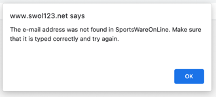
4. If you get this pop-up, ensure you have typed everything in correctly and are using the same email address you registered with then try again. If you are still seeing the error message, it’s possible the Athletic Trainer has not approved your account yet – please contact them. 
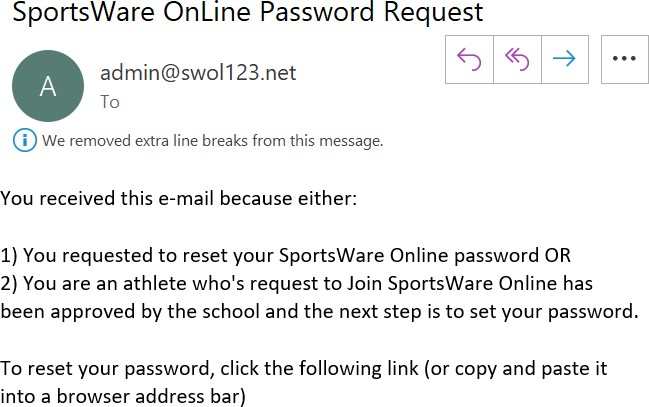
5. You will receive an e-mail with the subject “SportsWareOnLine Password Request”. Click the linkunder your name in this e-mail.
  • Complete this process within 24 hours, as the link will expire.
  • If you see multiple name/link combinations then you have multiple SportsWare accounts tied to this email address.

Graphical user interface, text, application, email  Description automatically generated


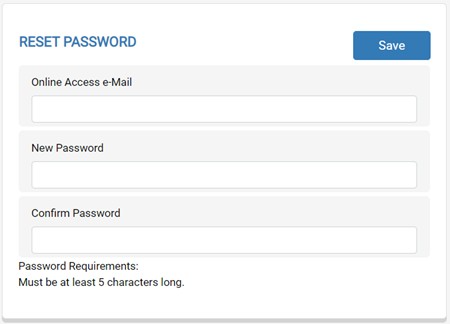
5. Enter the email address you registered with, a new password that meets the criteria, and then confirm the password. Click the Save button.

3. Graphical user interface, text, application, email

Description automatically generated


6. Return to www.swol123.net and enter in the email and password you just completed sign up with. Click Login.


    • Related Articles

    • I can't login to my account

      For Athlete/Parent accounts: If you are getting an error message that your email address can't be found in the system, please contact the school's athletics department or noted online contact for your school's SportsWare account. CSMi representatives ...
    • I'm having issues resetting my password.

      If the link isn't working These links are only valid for 24 hours. Please navigate to swol123.net and follow the reset password procedure to get a new link sent. If you are getting an error that the “ticket has expired” when clicking the link within ...
    • How to Reset Login Error Count

      For Users: Navigate to Admin > Users. Double-click on the user's name to open the record. In the General tab look for the section to the right It should be a number higher than 0. Click reset. Then Save. For Athletes: Navigate to the Athlete database ...
    • How to Add a Coach User to SportsWare

      Athletic Trainers have the option of adding their coaches into SportsWare and can see a number of benefits! Coaches can access real time information regarding athlete availability for practice and games, recieve alerts on new injuries and paperwork ...
    • How to add a QuickTreatments User

      QuickTreatment Modes: Athlete Mode: Requires the user to enter the Athlete’s password when creating a new QuickTreatment. ATC Mode: Does not require the user to enter the Athlete’s password when creating a new QuickTreatment. You only need one ...